26 Jan 2026
How to level up with Claude Code
This post is a running log on how I am levelling up my Claude Code usage. A lot of these things will probably be productionized soon by Anthropic and/or other similar products (Codex, Jules, Cursor, Amp etc.)
My goal with this post is to:
- Find interesting ways to use Claude Code or similar tools (via self exploration, but mostly by lurking on twitter)
- Experiment in my own setup
- If I see myself regularly using the “new way of working”, it makes to this list with a timestamp
- Fun reflection at 2026 end (and beyond) on how my personal setup (and this space) has grown
26th Jan 2026
(first entry so I will also plug-in all things from 2025)
My setup for ref: VS Code with Claude Code running on native terminal (not on the VS Code extension), considering Conductor but not convinced yet
-
Interview skill using
AskUserQuestiontoolThis is hands-down the BIGGEST value of life upgrade with Claude Code. A simple 3 line skill where you essentially productionize the act of asking clarifying questions with the seamless UX of asking questions natively in CC. The reason this works is because as humans we have two flaws:
- We rarely have a clear idea of what we want
- We suck at communicating effectively
And this hack then solves both of these. It helps you really think about what you actually want. I have ran into interviews session that were easily 60-75 mins+ just because my initial idea was at a very high level and my follow-on answers kept opening more threads. Reminds me of my McKinsey days when asking the right questions was literally the job :)
This skill also helps me take major decisions by thinking through the pros and cons of the decision with facts. A lot of times, I will just say, “i don’t know enough to make a decision” and then it will give me a lot of pros and cons to help make a decision. The UX of chat + interview baked into the same experience is super refreshing.
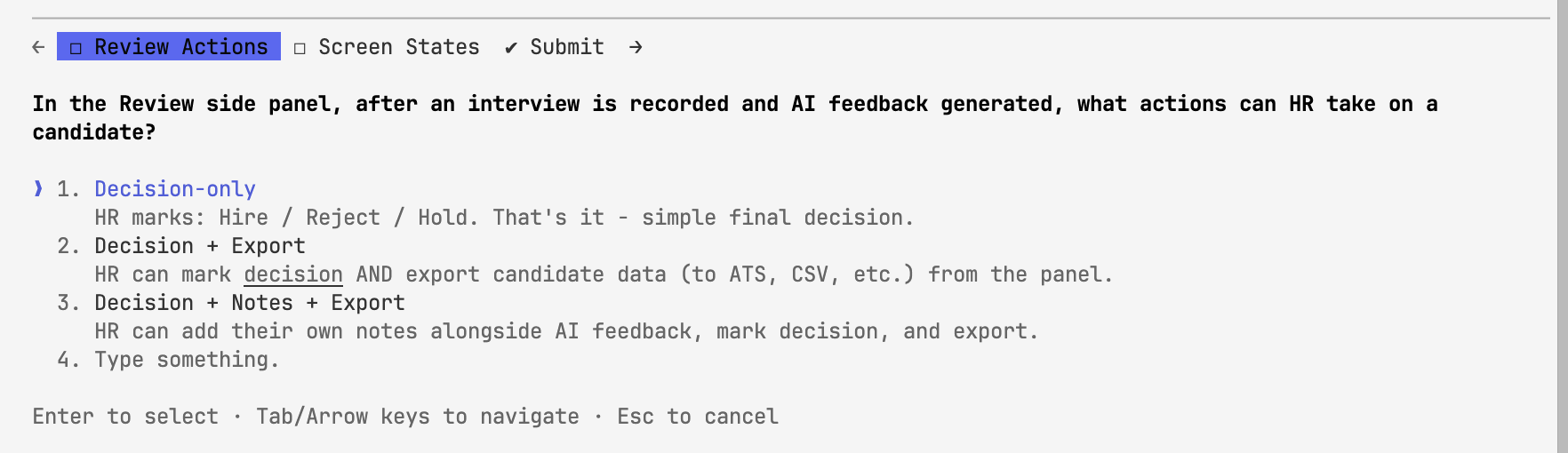
h/t Thariq from Claude Code team for ref.
How to set it up: Ask Claude Code to save this text as a “skill” in your root user directory:
 ---
 name: interview
 description: Interview the user in-depth about a specification file to gather
 comprehensive implementation details. Use this when the user wants to flesh out
 specs, discuss technical implementation, UI/UX decisions, tradeoffs, or concerns
 about a feature specification.
 ---

 read this spec file and interview me in detail using the AskUserQuestionTool
 about literally anything: technical implementation, UI & UX, concerns, tradeoffs,
 etc. but make sure the questions are not obvious

 be very in-depth and continue interviewing me continually until it's complete,
 then write the spec to the file.
Then whenever you want, just tell Claude Code to “interview” you for more clarifications and context.
-
Git Worktree Command (with local env migration and package json run baked in)
The reason why you should use worktrees in Claude Code is just the reason why you should use worktrees in general. It allows you to spin up multiple instances of the same branch and work parallely on features that don’t touch each other. You could run up parallel Claude instances on the same branch but there is no way for you to control ship just the changes made by one instance.
But this point is not just about using worktrees! It’s about a simple skill that removes all friction in spinning up a worktree and therefore, exponentially increases my usage of a worktree. Previously, I would ship common features in the same branch just because opening up a worktree was a few commands that I didn’t want to get into. Now everything that even barely needs a worktree, gets a worktree. We, humans, are simple like that.
The skill itself is pretty simple.
- Create a worktree from origin or a specified branch ->
- Copy the local env file ->
- Auto-run the package json file.
- Add the worktree on the VSCode side bar so you can manually review files in the new worktree.
That’s it! I still need to close claude and
cdinto the new worktree and then start claude again. The nativeadd-dirclaude command could work in theory, I just don’t get the confidence that I am in the right branch and things won’t get messed up. I will probably improve this somehow in the near future. -
Multiple terminals split in the same VS-code window
h/t Boris’ tweet. Once worktrees is working, you can split different Claude Code instances into different VS Code splits in the same window, such that you can automatically move b/w them with the ⌘+1/2/3 shortcut. Makes multi-tasking so much easier!
There is also the
Maximise Groupshortcut that can maximise just your current view if you want to deep focus on just one problem.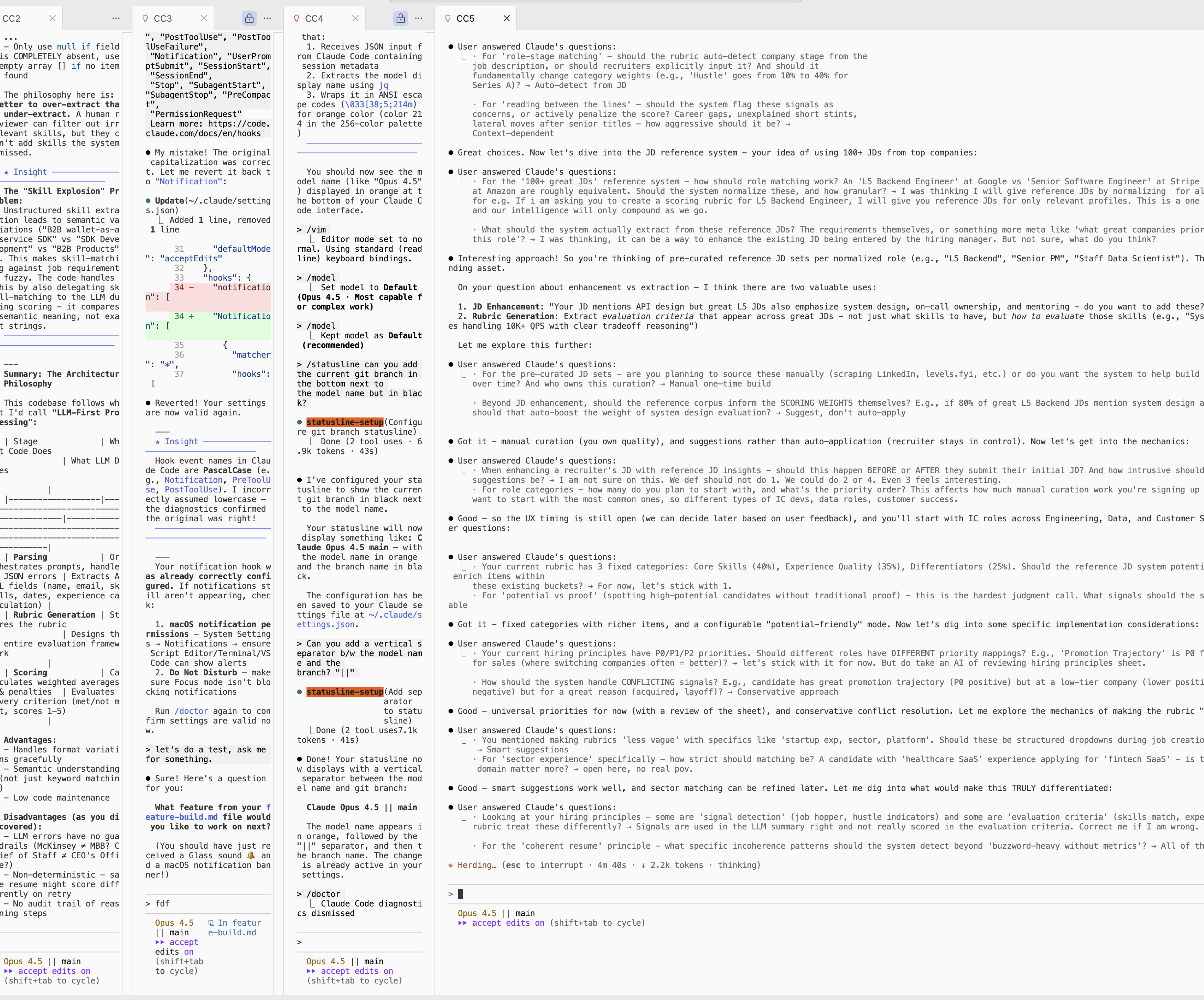
-
Additional honorable mentions that will get a deepdive maybe in the future:
- Enable MacOS notifications for Claude Code to ping you when it’s waiting for a response or done
- Frontend design skill - HUGE! Ask Claude Code to install this official plugin from Claude Code.
- Switch on ‘repositories’ mode in VSCode’s source control tab to see multiple worktree changes
- Custom
sync-permissionsskill that goes through your past chats, see which permissions you allowed and adds it to yourpermissionslist so you never approve the same command twice - AI slop removal command after each big coding session
- Run crob jobs via Claude code + Mac’s native cron job scheduler (e.g. send this slack message after analyzing x,y,z on Slack + Snowflake + Linear)
- VSCode shortcut to open a new terminal + enter Claude so I automatically land into Claude Code with one click - no retyping
Claudein terminal again - Modify Claude Code’s
status line configas per your pref. I personally like seeing the model and branch name.