A running log of (small) things I learnt!
The three squares in the corners of every QR code use a fixed 1:1:3:1:1 black-white ratio - picked in 1994 by measuring stacks of magazines and boxes to find the one pattern that almost never shows up in normal print, so a scanner locks on instantly and never mistakes a busy cereal box for a code ▸
That 1:1:3:1:1 rule is why the ratio survives no matter how you rotate the code - scan a line through any of the three corner squares from any angle, and you hit black-white-black-white-black in that same proportion. The scanner isn’t looking for a shape, it’s looking for that rhythm, and the 1994 team chose it precisely because it’s rare in ordinary print.
The other half of the magic is error correction. A QR code carries so much backup data that you can tear, smudge, or cover up to ~30% of it and it still scans - which is exactly how a brand stamps its logo in the middle without breaking the code.
The Cmd+Tab switcher only ever lists ‘Regular’ apps - which is why menu-bar utilities like Rectangle or 1Password’s helper run the whole time but never show up when you tab through. macOS lets an app declare itself an Accessory and stay invisible instead ▸
Every Mac app declares an activation policy with three tiers. Regular apps show up in the Dock and Cmd+Tab, like Safari or VS Code. Accessory apps still put windows on screen, keep a menu-bar icon, and answer global hotkeys, but they never touch the Dock or the switcher. Prohibited apps have no UI at all.
An app sets its tier one of two ways: a flag in its Info.plist (LSUIElement = true) at build time, or one line at launch (setActivationPolicy(.accessory)). Some ship as Regular so you can find them during onboarding, then quietly demote themselves once they’ve settled into the menu bar.
I went down this hole trying to hide fns, a little Vim-scroll utility, from my switcher. Editing the Info.plist breaks the app’s code signature, so it won’t launch until you re-sign it. And even then, macOS won’t let you touch a signed app inside /Applications at all - you just get “Operation not permitted”, no password prompt, no explanation. That’s App Management protection, added in Ventura: only an app Apple has blessed, or one you’ve whitelisted in Privacy settings, can modify another app’s bundle.
Sturgeon’s Law - ‘90% of everything is crap’ - was coined by a 1950s sci-fi writer as a defence of his genre, not a put-down ▸
Critics kept saying almost all of sci-fi was crap. As a defence, Theodore Sturgeon conceded and went bigger: 90% of films, books, and companies is crap too. But you judge a field, or even your own output, by the 10% where the magic happens.
The 90% crap is the price you pay for the magic of the 10%. It also means you have to put in the time to get the 90% crap out before you reach the 10% magic.
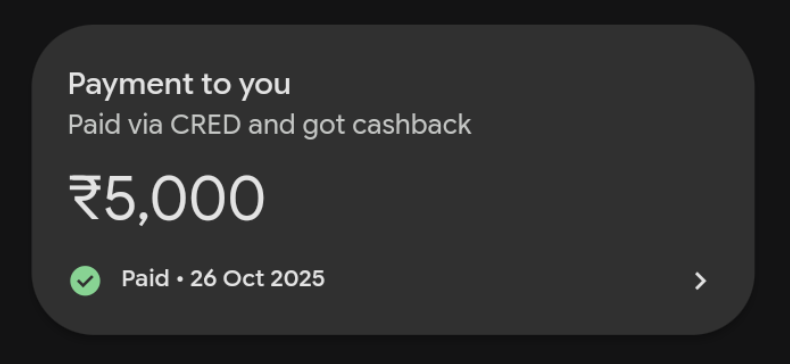
CRED hijacks the UPI remarks field to advertise inside GPay’s transaction history - ‘Paid via CRED and got cashback’ shows up in the receiver’s app ▸
UPI transactions have a remarks/transaction note field that travels across the entire UPI ecosystem, as mandated by NPCI. When CRED initiates a payment, it sets this remark to ‘Paid via CRED and got cashback’ - and GPay, PhonePe, or any UPI app simply renders it as-is in your transaction history.
Free smart distribution inside a competitor’s app, similar to ‘Sent from iPhone’ in email signatures.
Uninstalling an app on macOS doesn’t delete all its data - apps like Spotify and Prime Video can leave behind 10+ GB of orphaned data ▸
Unlike windows, macOS has no formal uninstall process - “uninstalling” is just dragging the .app to trash. The OS has no hook to clean up associated data, and app data is scattered across ~/Library/Application Support/, ~/Library/Containers/, ~/Library/Caches/, ~/Library/Preferences/ etc.
I was cleaning up storage with Claude Code and discovered AppCleaner - free and SUPER useful!
If you ‘undo’ a highlight on a Kindle, temporary ghosting remains on the page that only disappears on full page turn. This is because e-ink displays use ‘partial refresh’ for small actions like removing highlights ▸
E-ink pixels are tiny capsules filled with black and white particles that move with electric charge.
A full refresh (the brief black flash on page turns) slams all particles to their correct positions - showing a crisp display. A partial refresh only nudges the changed pixels, which is faster and avoids the flash, but some particles don’t fully migrate - causing that faded/ghosted look.
When you copy an image from Google Docs to markdown, to give ahead to an LLM tool, your context will almost always bloat out. This is because the image gets converted to a massive Base64-encoded data and a single image can blow up into a 15+ page Google doc ▸
Instead of referencing an external URL (), the image’s binary data gets encoded as a long ASCII string embedded inline (). It makes the content self-contained but massively bloated.
Smallest width developer settings on Android let you increase screen real-estate beyond what’s normally possible ▸
A lot of other interesting settings in developer options too, including reducing animation speed that makes the phone so much more snappier.
Bluetooth has a ‘sniffing’ mode to magically connect with switched-off devices ▸
Most Bluetooth devices even when “asleep” can receive your other BT device’s connection request and magically “wake up”. For e.g. your laptop can connect with your switched off bluetooth speaker.
The speaker is in “sniffing” mode where a tiny part of its bluetooth radio is kept on to periodically “sniff” for incoming BT connection requests. A pre-paired device remembers each other’s BT addresses and can therefore connect to each other magically. This also ensures that no non-paired devices can just randomly wake up your bluetooth speaker.
Spotify allows you to paywall podcast access from other subscriptions ▸
Spotify now allows you to paywall protect podcasts with real time info-sharing of your subscriptions on other platforms. E.g. this NYT podcast that is only accessible to NYT subscribers, with in-app authentication possible on Spotify to vet your subscription status.
Your Mac has a built-in job scheduler! ▸
Knowing this means you can potentially “program” your laptop to do X things at Y time of the day every Z days. This fact, merged with Claude Code Skills, effectively means you can setup complicated workflows in a recurring manner all natively on your Mac, with no need to access any server based service like n8n, github actions etc.
There are 2 built-in job schedulers in Mac: Cron and Launchd. Cron will miss stuff out if your laptop is “off” at the time of the job. Launchd can queue in stuff so even if a job is missed, it will re-activate the next time your Mac wakes up.